使用 Vite 进行组件测试
概述
Nightwatch 中的组件测试构建于我们的 vite-plugin-nightwatch 插件。该插件可以在使用 Vite 的项目中使用。
什么是 Vite?
Vite 是一种针对现代 Web 应用程序的极速构建工具,最初是为 Vue.js 应用程序创建的,但现在也支持 React 和其他 UI 框架。Vite 是法语中的“快”的意思,这很恰当,因为在所有可用的前端构建工具中,Vite 是最快的,也是最容易使用的构建工具之一。
如果您使用过 Babel 或 Webpack 等工具,您可能熟悉构建设置的复杂性和缓慢的启动时间带来的问题。Vite 以某种方式设法消除了所有这些问题,提供了一个开箱即用的工具,该工具利用了现代浏览器的最新功能来直接处理 ES 模块,因此无需使用 Babel 等工具。
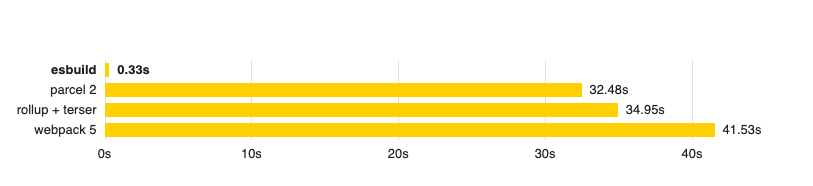
此外,Vite 在幕后使用 ESBuild 来捆绑 Javascript 代码和相关资产,这似乎是所有工具中最快的。
安装
步骤 1.
Vite 插件可以通过 NPM 安装,命令如下
步骤 2.
如果您已经在项目中使用 @nightwatch/react 或 @nightwatch/vue,请跳过此步骤。Nightwatch 会自动加载 Vite 插件。否则,更新您的 Nightwatch 配置并将插件添加到列表中
module.exports = {
  plugins: ['vite-plugin-nightwatch']
}
步骤 3.
更新您的 Vite 配置
import { defineConfig } from 'vite'
import nightwatchPlugin from 'vite-plugin-nightwatch'


export default defineConfig({
  plugins: [
    // ... other plugins, such as vue() or react()
    nightwatchPlugin()
  ]
})
Nightwatch 假设 Vite 开发服务器已经在运行,并将使用 https://:3000 作为基本 URL。您可以在 nightwatch.conf.js 中通过设置 launchUrl 或 baseUrl 属性来更改此 URL。
要启动 Vite 开发服务器,请在项目中运行
插件选项
该插件接受一些配置选项
- componentType
指定要测试的组件类型。可能的值
vue(默认值,如果没有指定)react
export default {
  plugins: [
    // ... other plugins, such as vue() or react()
    nightwatchPlugin({
      componentType: 'vue'
    })
  ]
}
- renderPage
指定要使用的自定义测试渲染器的路径。该软件包中包含了 Vue 和 React 组件的默认渲染器,但此选项可以覆盖该值。
export default {
  plugins: [
    // ... other plugins, such as vue() or react()
    nightwatchPlugin({
      renderPage: './src/test_renderer.html'
    })
  ]
}
API 命令
此插件提供了一些 Nightwatch 命令,可以在编写测试时使用。
- browser.mountVueComponent(componentPath,[options],[callback])
参数
componentPath– 要挂载的组件文件 (.vue) 的位置options– 这可能包括callback– 一个可选的回调函数,它将使用组件元素进行调用
示例
const component = await browser.mountVueComponent('../../../src/components/Form.vue', {
  plugins: {
    store: '../../../src/lib/store.js',
    router: '../../../src/lib/router.js'
  },


  mocks: {
    '/api/get-user': {
      type: 'fetch',
      body: {
        data: {
          "firstName": "Jimmy",
          "lastName": "Hendrix"
        }
      }
    }
  }
})
- browser.mountReactComponent(componentPath,[props],[callback])
参数
componentPath– 要挂载的组件文件 (.jsx) 的位置props– 要传递给 React 组件的属性,这将被序列化为 JSONcallback– 一个可选的回调函数,它将使用组件元素进行调用
示例
const component = await browser.mountReactComponent('../../../src/components/Form.jsx')- browser.launchComponentRenderer()
这将调用 browser.navigateTo('/nightwatch/') 并打开浏览器。如果使用 .importScript() 命令,则需要在调用之前使用。
您也可以在运行时将 launchUrl 设置为全局变量,然后要使用的 URL 将是 ${browser.globals.launchUrl}/nightwatch,这使得可以动态设置启动 URL。
- browser.importScript(scriptPath,[options],[callback])
参数
scriptPath– 要注入到页面中的脚本文件的路径,该脚本将渲染组件;需要以 ESM 格式编写options– 这可能包括scriptType: 要在<script>标签上设置的type属性(默认值为module)componentType:vue或react(默认值为vue)
callback– 一个可选的回调函数,它将使用组件元素进行调用
示例
const formComponent = await browser
  .launchComponentRenderer()
  .importScript('../../../test/lib/scriptToImport.js');
示例 scriptToImport.js
import {mount} from '../../../node_modules/@vue/test-utils/dist/vue-test-utils.esm-browser.js'
import Component from '../../../test/components/vue/Form.vue'


let element = mount(Component, {
 attachTo: document.getElementById('app'),
 global: {
   plugins: []
 }
});


// This will be used by Nightwatch to inspect properties of this component
window['@@component_element'] = element;